Webcyte Design Font Viewer Download

"Webcyte Design Font Viewer helps you browse through hundreds of fonts."
Webcyte Design Font Viewer helps you browse through hundreds of fonts.It's a tool for web designer.Let you see how the font looks whenl you highlight the text and select the font.
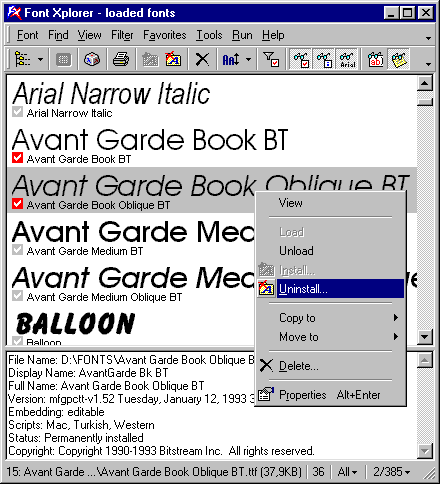
Font Xplorer 1.2.2 is now freeware. Hopefully, the all-new version 2 will be available in the future.
Font Xplorer does not support Adobe Type 1 fonts and OpenType fonts with PostScript outlines. It works with TrueType and OpenType fonts that have TrueType outlines.
Do you need to find that perfect font for best friend's birthday card? Want to get a detailed overview of all the fonts installed on your system? Or, so you find that font installation in Windows is too difficult for you? Want to print professionally designed sample sheets listing all your fonts? Font Xplorer comes to the rescue! Designed for both beginners and professionals, this font tool should find a place in every computer.
Some features:
- Browse both installed and not installed TrueType* fonts from disk.
- See what each font looks like, so it's very easy to compare fonts
- Special "user text compare" mode allows you to find the perfect font in seconds
- Load, install, unload, uninstall, manage fonts
- Print pre-designed, professional sample sheets and font listings
- Save bitmap images of fonts
- Search for duplicate fonts using CRC check
- Rename font files to use a font's full name with undo support (i.e. arialbi.ttf to Arial Bold Italic.ttf)
- Comprehensive font info is available (full name, copyright, embedding info, available character sets etc.)
- Advanced, resizable character map that shows all a font's scripts and allows you to zoom in on any character. You can even copy a symbol to the clipboard as a vector image or rich text
- View extended font metrics information
- View the installation status of fonts to instantly determine if that font is already installed
- Filter fonts by character set so you only see symbol fonts, for example
- Mark fonts and optionally view only marked fonts
- Integrated Repair Wizard solves most common problems with fonts
- Extensive support for calling external programs. Plus support for different variables in callable command lines
- Fully customizable toolbars and menus with Office 2000 look & feel. Mix menus and toolbar buttons, create new toolbars, reposition them etc.
- And much more for you to discover...
The Font Thing

From Sue Fisher: Browse installed and uninstalled TrueType fonts, viewing sample text, individual characters, and detailed font information. Easy font-management functions let you install, uninstall, print, copy, or delete any number of fonts at once. You can even store your own notes with them, filter them according to type (serif, sans serif, and so on), and group them into collections for convenience. This version lets you choose your font colors, set up drop-down lists of standard text samples, rename font files to avoid conflicts, and load fonts temporarily for use without installing them.
This traditional font browser has a few advanced features that make it a worthy download for designers with large collections of fonts. Upon installation, The Font Thing automatically finds all fonts located on your computer and puts them in a chart for better organization. Next to each entry in the chart is a sentence written in that particular font, enlarged versions of each letter in the alphabet, and detailed information on the font. It is easy to add and remove fonts from this list quickly; organizing and renaming fonts in a collection also is straightforward. We do have one gripe: The Font Thing does not synchronize with other programs, such as image editors. But did we mention that it's free?

FindThatFont description
A handy tool that allows to preview fonts installed on your system and classify them into over 30 different categories.
FindThatFont! is a handy and free tool that allows to preview fonts that are installed on your system and to classify them into over 30 different categories. By using FindThatFont! you will be able to find any font on your computer faster then ever before.
Here are some key features of "FindThatFont":
· Shows a preview of all fonts installed on your system, either grouped in categories or in alphabetical order
· Extendible through extensions, as easy to install as Firefox extensions
· Classify fonts yourself, in 36 different categories
· Long list of fonts already categorised
· Option to hide fonts that you’ll never use
· Create a dynamic short-list of favourites that you want to compare
· Search a font by name
· Print list of fonts directly from the program
· Export font list to W3C compliant HTML file, that you can view with your favourite web browser.
· Custom sample text, color and font size
· Import and export functionality to transfer categorisations between computers or user-profiles.

Using the free font viewer will allow you to experience how different text will look in different fonts with different font colors and various background colors. This tool is very useful when you are designing or modifying the looks of a website or any design project. This utility is very simple to use, just type the text you want to view in all different fonts and press the enter button to get your text decorated in all the fonts available on your system. Use the bold, italic, underline, strike out, font color and background color buttons as labeled to get all the variations you need.
This version is the first release on CNET Download.com.
Code128bWin Barcode Font

This package includes two Code 128 barcode fonts, standard and large. There is an online tool available for creating a code 128 barcode from raw text. The code can then be cut and pasted into your document. Please see the Readme.txt file for details. Archive includes a PDF file for installation instructions.
Font Checksum (Java)

Operating System Requirements:
This product is designed to run on the following operating systems:
- Windows Vista
- Windows XP
- Windows 2000
- Windows ME
- Windows 98
My Font Tool - convert handwriting into font

Format: Software | Size: 1,994KB | Date: Jan 2007 | Version: 1 | System Requirements: Windows 2000/XP | License: Free
Want to personalize your Tablet PC, UMPC, or other ink enabled device running Windows Xp / Tablet PC Edition? Well, in this edition of a GottaBeMobile.com InkShow, we will show you a cool little toy that allows you to do just that!
The name of the application is "My Font Tool", and is actually a Microsoft Tablet PC "PowerToy". PowerToys are small applications that Microsoft allows you to download and install for free, that add some kind of limited functionality in some category. There are games, utilities, training apps, plus other categories of useful tools.
My Font Tool allows you to create a True Type font -- in your own handwriting! Check out the InkShow, and learn how you can create your own handwriting font! Let us know if you produce any cool looking fonts, and we may post a few of them!
Publisher's description of My Font Tool
From Microsoft: My Font Tool converts your handwriting into a TrueType font, making typed text appear written by hand.
FontHit Font Tools description
Manage, Install/uninstall, view/preview, print, search fonts.
With the currently available plugins you can preview, view, customize size and text of the previews, print in color, install, uninstall, browse your hard drive and view fonts in convenient categories, use drag-'n-drop to add font files (even folders and zip files with fonts) to the preview list. You can also search the web for fonts and font-related webpages right from within the Font Tools, using the FontHit Search plugin.
Publisher's description of FontHit Font Tools
From FontHit Software:FontHit Font Tools is a manager that allows you view, preview, install, uninstall, print in color, customize size and text of the previews, browse your hard drive for fonts, create your own folders that you can drag fonts into, convenient and automatic categorization, drag-n-drop to add font files (even folders and zip files with fonts) to the preview list, and character map. You can also search the Web for fonts and font-related Web pages.
This new version supports drag-'n-drop viewing of fonts within .ZIP files and includes some major bug fixes.

Free&Easy Font Viewer Publisher's Description
System Requirements
Nothing special required
What's new
The program has been optimized and tested under MS Vista.


